Flagger Examples
Progressive delivery is a modern software release approach that enables controlled and automated deployments, reducing risk while ensuring smooth rollouts. In this guide, we explore how to use Flagger with both NGINX and Istio to implement canary deployments effectively.
NGINX #
For this setup, we leverage Flux for managing Helm releases, but the installation is done using the official Helm chart.
By setting meshProvider to nginx, we ensure Flagger is configured for NGINX ingress.
Defining a custom metric for flagger #
The workload we’re deploying exposes a custom metric, test_service_request_rate. To use
it in flagger we must define a MetricTemplate:
apiVersion: flagger.app/v1beta1
kind: MetricTemplate
metadata:
  name: flagger-demo-1-error-rate
spec:
  provider:
    type: prometheus
    address: <path to prometheus>
    insecureSkipVerify: true
  query: |
    (sum(
      rate(
        test_service_request_rate{code="500"}[{{ interval }}]
      )
    )
    /
    sum(
      rate(
        test_service_request_rate[{{ interval }}]
      )
    )) * 100
Defining canary process for NGINX #
Next we must define some deployment, ingress and a canary object:
apiVersion: flagger.app/v1beta1
kind: Canary
metadata:
  name: flagger-demo-1
spec:
  provider: nginx
  targetRef:
    apiVersion: apps/v1
    kind: Deployment
    name: flagger-demo-1
  ingressRef:
    apiVersion: networking.k8s.io/v1
    kind: Ingress
    name: flagger-demo-1-ingress
  progressDeadlineSeconds: 60
  service:
    port: 80
    targetPort: 8080
  analysis:
    interval: 10s
    threshold: 10
    maxWeight: 50
    stepWeight: 5
    metrics:
      - name: "error percentage"
        templateRef:
          name: flagger-demo-1-error-rate
          namespace: flagger-demos
        thresholdRange:
          max: 10
        interval: 1m
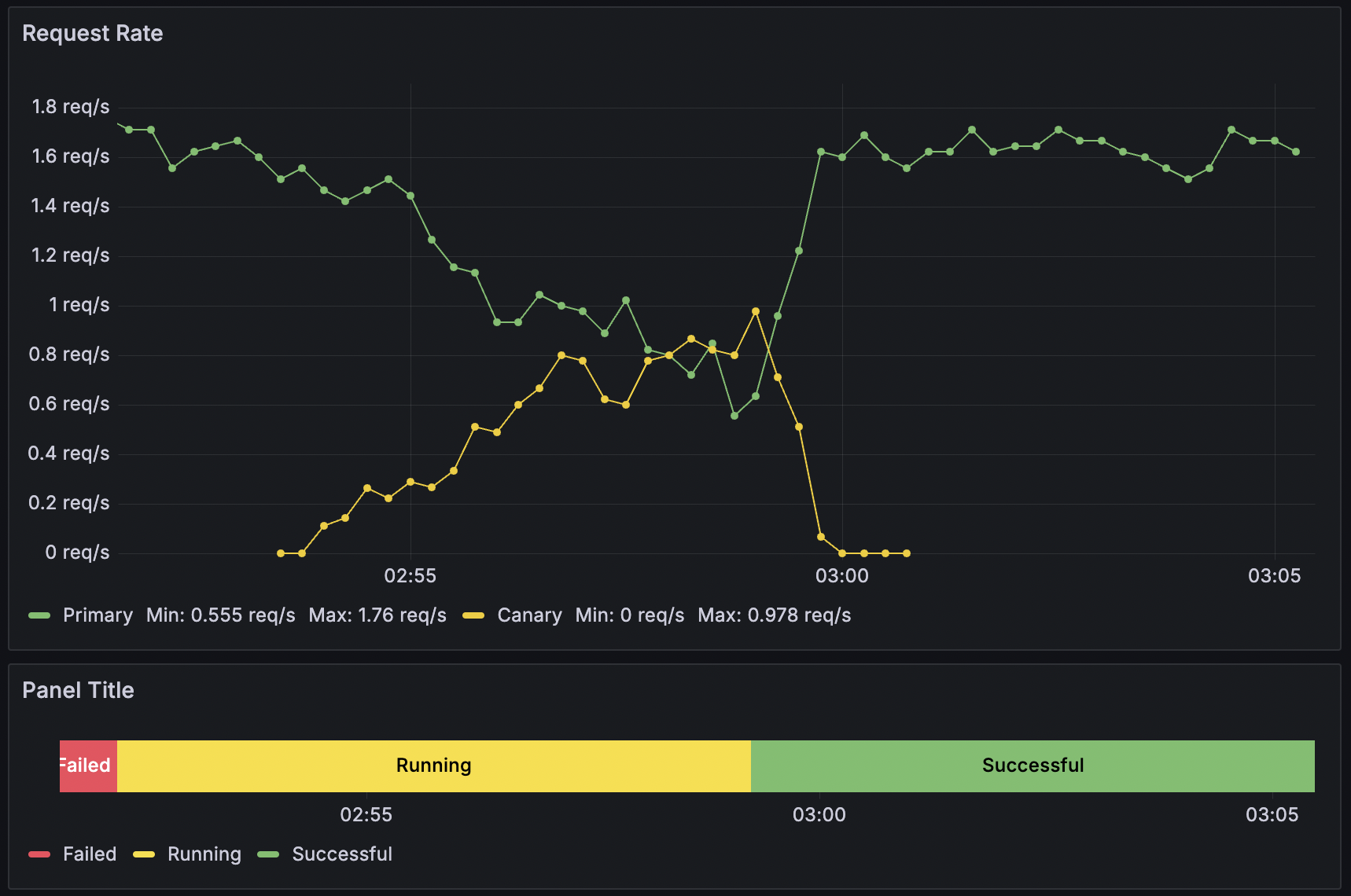
The analysis section tells flagger to create a canary release process, scaling up the canary version from 0 to 50% of
the traffic before promoting it to be the new primary. Section service instructs flagger to create service objects
using the specified port combination. Note that this will result in services
- flagger-demo-1 (alias for -primary)
- flagger-demo-1-primary
- flagger-demo-1-canary
It will also create a new deployment flagger-demo-1-primary. To split traffic, flagger creates a second ingress
object similar to the existing one, but using canary annotations
:
- nginx.ingress.kubernetes.io/canary: true
- nginx.ingress.kubernetes.io/canary-weight: X
A canary release is triggered by making a change to the deployment.template.spec, a mounted configmap or the
canary object itself. During a release, flagger will look at metrics. To populate metrics, there needs to be traffic.
To ensure traffic during a release you can use webhooks or manually watch curl ... your ingress.
Istio #
Installation is similar however we install flagger in the istio-system namespace.
We also set meshProvider: istio.
In this example we’re not going to use a custom metric but use istio’s built-in metrics for request rate
and errors. The canary definition:
Defining blue/green process for istio #
apiVersion: flagger.app/v1beta1
kind: Canary
metadata:
  name: flagger-demo-2
  namespace: flagger-demos
spec:
  targetRef:
    apiVersion: apps/v1
    kind: Deployment
    name: flagger-demo-2
  progressDeadlineSeconds: 60
  service:
    port: 8080
    targetPort: 8080
    gateways:
      - istio-system/public-gateway
    hosts:
      - demo.example.de
    trafficPolicy:
      tls:
        mode: DISABLE
    retries:
      attempts: 3
      perTryTimeout: 1s
      retryOn: "gateway-error,connect-failure,refused-stream"
  analysis:
    interval: 1m
    iterations: 10
    threshold: 2
    mirror: true
    mirrorWeight: 100
    metrics:
      - name: request-success-rate
        thresholdRange:
          min: 99
        interval: 1m
      - name: request-duration
        thresholdRange:
          max: 500
        interval: 30s
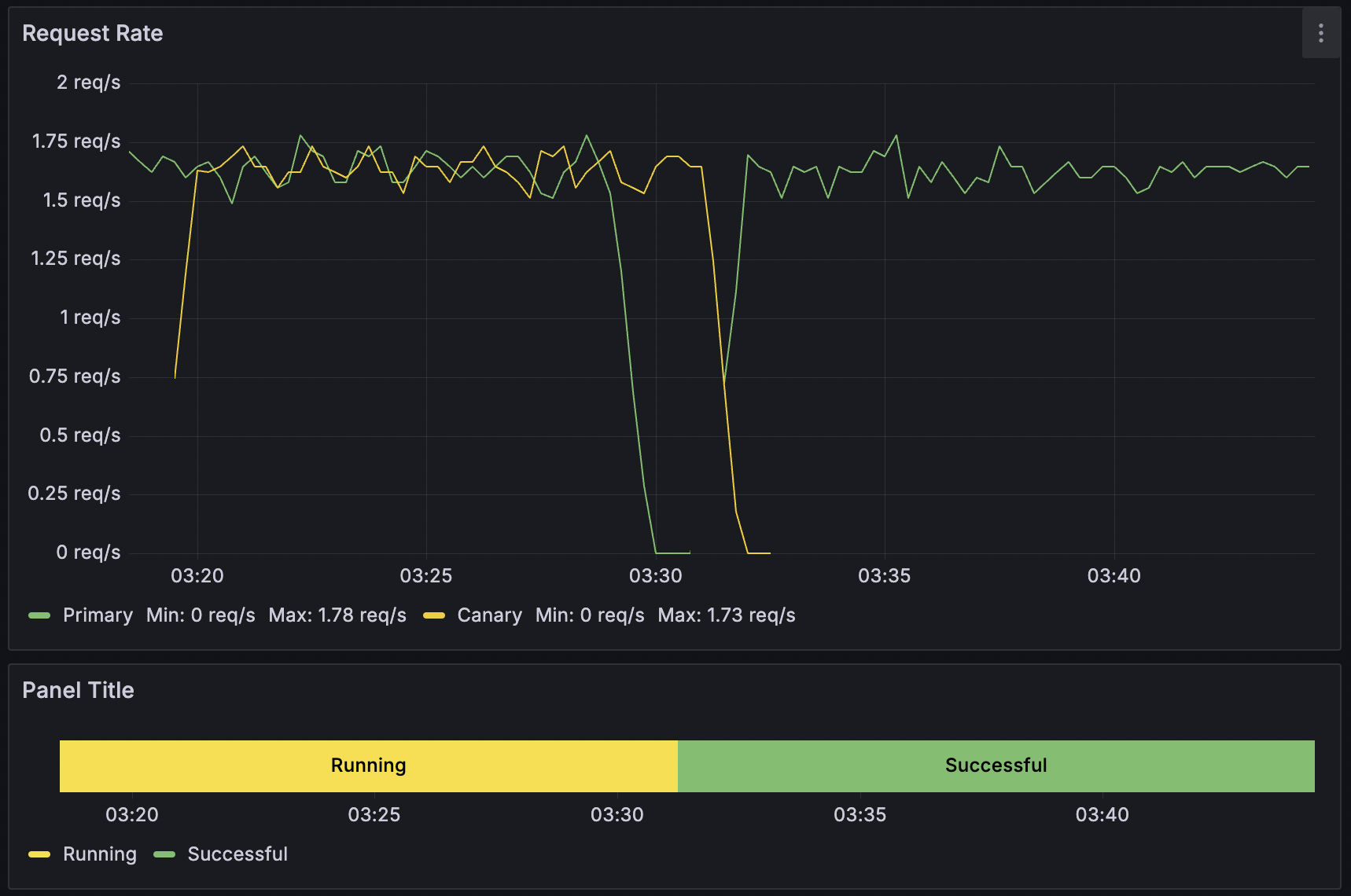
This canary object defines a blue/green release process that mirrors traffic to the canary version while maintaining stability. Instead of using a step-by-step traffic shift, we define iterations and enable mirror: true to duplicate live traffic to the canary before making it active.
When releasing, Flagger creates or updates a VirtualService object to handle traffic routing. When traffic mirroring is enabled, Flagger utilizes HTTPMirrorPolicy , ensuring that a copy of live traffic reaches the canary without impacting the primary service.
Istio then intelligently routes traffic between the flagger-demo-2-primary and flagger-demo-2-canary services, allowing analysis of the new version before full deployment.
Dashboards #
The graphs in this post show the istio request rate:
SUM(rate(istio_requests_total{destination_app=~"${canary}-primary"}[1m])) by (destination_app)
and canary status:
SUM(flagger_canary_status{name="${canary}"})
Conclusion #
Using Flagger with NGINX and Istio enables safe, automated progressive rollouts. By leveraging custom and built-in metrics, teams can gain better control over deployment stability. Try it out and enhance your DevOps pipeline today!